
If you are looking for a secure and inexpensive way to buy Bitcoins using PayPal, you may have heard of VirWoX or LocalBitcoins. Whether you have or not, this article explains how to buy Bitcoin using those two platforms and several other services that work well today.
Our step-by-step guide to buying Bitcoin with PayPal
Quick steps to buy bitcoins with PayPal
- Sign up on eToro if you plan to buy Bitcoin as a CFD.
- If you prefer to use an exchange, choose one that accepts PayPal (for example, LocalBitcoins or Paxful).
- Select PayPal as your payment method.
- Deposit funds following the platform’s instructions.
- Place an order to buy Bitcoin.
Buying Bitcoins with PayPal on LocalBitcoins
LocalBitcoins.com is one of my top choices when I want to buy Bitcoin with funds in my PayPal account. On this peer-to-peer marketplace you can search and find dozens of sellers who accept PayPal and may offer ways to reduce fees.
Each seller sets their own terms. Generally they require a verified PayPal account and some account history. Here is an example of common seller conditions:
- Your PayPal account must be verified and your real name must match the name on LocalBitcoins.
- From PayPal, send payment to the seller’s email using the “Send money to friends and family” option.
- Sending money as friends and family is free. If that option is not available, a 5% fee may be charged.
The system is secure because the seller first deposits the amount of BTC you want to buy into the marketplace’s escrow. Once the seller verifies your payment, the BTC is released to your wallet. That reduces the risk of either party failing to complete the trade, but you should still check seller ratings before trading.
About fees
- When transferring BTC from the platform wallet to another wallet, a network fee applies, typically between 0.0001 and 0.0010 BTC depending on the network conditions.
- Users who advertise as sellers or buyers pay a 1% fee on traded volume.
PayPal’s “Modular Device Payment System” patent suggests that soon we may be able to connect our PayPal account directly to crypto wallets, for BTC and other cryptocurrencies.
Buy Bitcoins with PayPal on VirWoX

If you want to convert your PayPal balance into Bitcoin quickly, VirWoX is a popular option and can be almost instantaneous. Fees are reasonable and transaction security is high.
This exchange has been operating for years and was originally focused on users of Second Life who purchase the platform’s virtual currency, SLL. That mechanism allows you to buy Bitcoin using PayPal funds.
1. Register on VirWoX
When entering your details, leave the “Connect with avatar” option unchanged unless you actually have an avatar in Second Life.
2. Deposit funds using your PayPal account (new accounts often have a deposit limit, for example €90).
3. Once funds are in VirWoX, buy Second Life Linden Dollars (SLL).
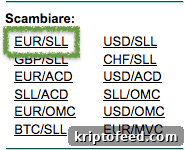
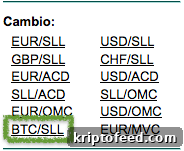
4. After obtaining SLL, place an order on the SLL/BTC market to buy Bitcoin.
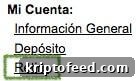
5. When your order is filled, the BTC will appear in your VirWoX balance. Go to Withdraw, enter the amount to withdraw and add your wallet address to transfer the BTC to your own wallet.
Deposit fees typically include a fixed charge of €0.35 plus 3.4% of the deposited amount. When converting SLL to BTC you should consult VirWoX’s fee table, since fees depend on order size and whether you use market or limit orders.
In addition to PayPal, VirWoX accepts other payment methods such as Paysafecard, Neteller, OKPay and credit/debit cards. Fees differ depending on the currency and amount moved.
[featured site=’eToro’ ][/featured]
Using PayPal to buy Bitcoins on Cryptonit
 Cryptonit is an exchange operating since 2013 that allows you to exchange PayPal balance for Bitcoin quickly and with minimal complications.
To verify your account for the first time they will typically ask for ID (national ID or driver’s license) and a document showing your address. These checks take time but provide necessary security.
As with other exchanges, you will deposit funds from PayPal in euros or dollars, and then use those funds to buy BTC.
Fees on Cryptonit tend to be higher:
- 9.8% of the deposited amount (minimum €2).
- 2% fee to withdraw funds back to PayPal (minimum €1).
Transfer PayPal credit to Bitcoin with Wirex App
The recently relaunched Wirex card is available in physical and virtual formats. After registering with Wirex, you will find the option to buy Bitcoin using your PayPal balance. This is one way to top up the Wirex debit card, which can then be used anywhere Visa or MasterCard are accepted.
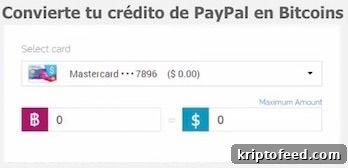
This is another option to convert PayPal credit into Bitcoin and then spend it as you wish.
If you choose a virtual card, you typically fund your Wirex account with a small amount (for example $3), create the virtual card and receive confirmation by email within seconds. After activation, link the card to your PayPal account and transfer funds to the new card.
xCoins is a company based in California that enables obtaining Bitcoin using “secured loans.” It is not a traditional exchange but a peer-to-peer lending platform that connects lenders and borrowers of Bitcoin. The loan model enables instant transactions and broader payment options, and xCoins also accepts PayPal.
- Obtain bitcoins instantly in many cases.
- Easy to use: register, make a payment to buy bitcoins, and receive them promptly.
- Secured loan model speeds up purchases and enables more payment methods (for example, PayPal and credit/debit cards). Borrowers can resell their bitcoins for fiat at any time.
[flytonic-button text=’Buy bitcoin on XCoins’ linkurl=’https://xcoins.io/?r=e5ivlb’ size=’lg’ icon=’none’ bg_color=’green’ text_color=’lgt’]
Another service that supports buying Bitcoin with PayPal is Coinbase, but note it is available only in the United States for PayPal-based purchases in some cases.
Tips
Buying Bitcoin with PayPal is convenient for users who only have PayPal as a payment option. It is not always the cheapest route, so consider these tips:
- Compare not only deposit fees but also the actual Bitcoin purchase price on each platform.
- Although the platforms mentioned are generally secure, convert your deposit to Bitcoin and withdraw it to your personal wallet as soon as possible so you maintain full control of your funds.
Your purchase and disputes
When you buy Bitcoin with PayPal, you often have an advantage over the seller because PayPal offers chargeback protections. This is one reason PayPal historically discouraged using its platform for digital currency trades.
For example, if you claim you never received the Bitcoin, and the seller did not collect strong proof of the transaction, the seller may have difficulty proving delivery. That could, in some circumstances, leave you with both the Bitcoin and a refunded payment, which is why sellers often set strict terms and verification requirements.